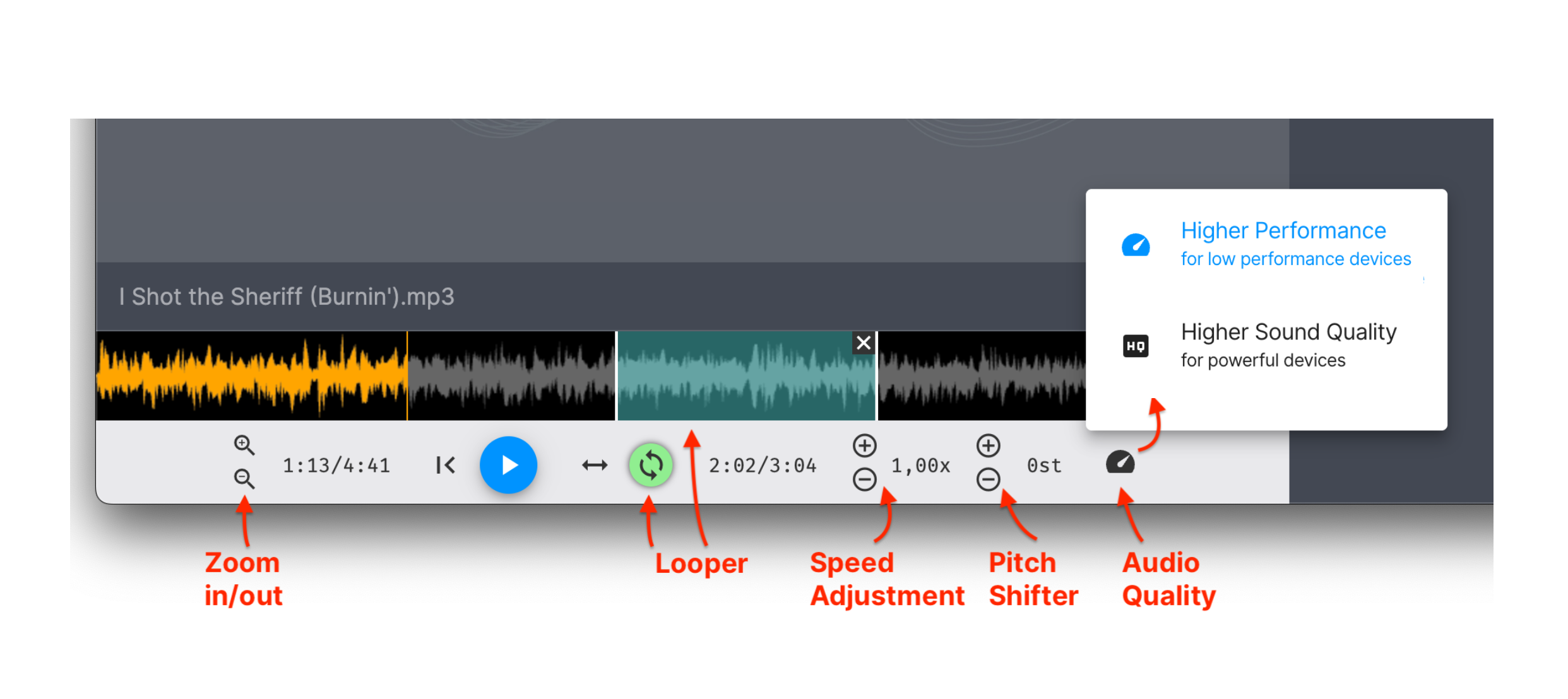
The doozzoo audio player is an essential tool for music education, providing a set of professional features that support effective teaching and learning. Below is a clear overview of its main functionalities:
1. Speed Adjustment Without Pitch Change
You can play audio tracks faster or slower without altering the pitch. Ideal for practicing difficult passages or slowing down complex rhythms.
2. Pitch Shift (Transposition)
Adjust the pitch of a track in semitone steps. This is helpful when a piece needs to be transposed into another key or adapted to better suit a student's vocal range or instrument.
3. Looper – Repeat Selected Sections
Highlight any part of the track and play it in a continuous loop. Perfect for focused practice of specific passages.
4. Audio Player Quality Settings
The player offers two quality modes that adapt to the performance capabilities of the device:
Higher Performance – optimized for lower-performance devices to ensure stable playback.
Higher Sound Quality – for high-performance devices that can deliver the best possible audio fidelity.
Overview of Audio Player functionalities:
Was this article helpful?
That’s Great!
Thank you for your feedback
Sorry! We couldn't be helpful
Thank you for your feedback
Feedback sent
We appreciate your effort and will try to fix the article